In the digital age, faxing documents is still a necessity for many businesses and individuals. With UltimateFax, sending a fax from your iPhone is as easy as a few taps. Discover the simplicity and convenience of faxing on the go with our user-friendly app.
Step-by-Step Guide to Sending a Fax on Your iPhone:

- Download the UltimateFax App for iOS.
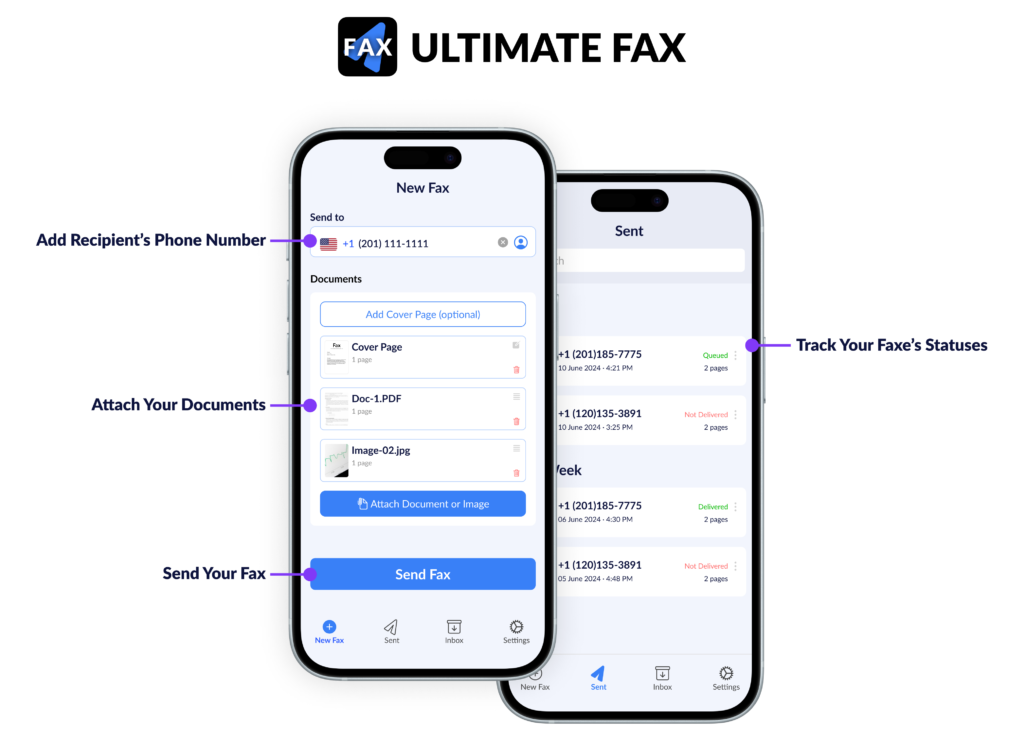
- Prepare Your Fax. Enter your recipient’s fax number. Create a cover page if needed, giving your fax a professional touch. Attach the documents you wish to fax. You can upload files from your iPhone, or use your device’s camera to scan documents directly.
- Send Your Fax. Once your document is ready and recipient details are set, simply click the “Send Fax” button. UltimateFax will handle the rest, ensuring your fax is sent promptly.
- Track Your Fax. After sending, your fax will be queued for delivery. Enable notifications on your iPhone to receive updates about your fax status.
Why UltimateFax is Your Ideal Choice for Faxing on iPhone:
- Convenience at Your Fingertips: Sending a fax is as simple as a few clicks.
- Efficient Document Handling: Whether it’s scanning with your camera or attaching files, UltimateFax makes it easy.
- Stay Informed: Real-time notifications keep you updated on your fax status.
- Secure and Reliable: Trust in the security and efficiency of your fax transmissions.
Benefits of Using UltimateFax:
- Send faxes from anywhere at any time.
- Eliminate the need for traditional fax machines and paper.
- Enjoy a streamlined, paperless faxing process.
- Save time with quick, intuitive operations.
Sending a fax from your iPhone has never been easier. With UltimateFax, you’re just a few clicks away from transmitting documents securely and efficiently. Experience the ultimate convenience in faxing – download UltimateFax today and transform your iPhone into a powerful faxing tool.